
Remember last week when we retargeted those 120 animations? That was for setting up a motion matching network for our player character to cover our locomotion needs (walking, running, etc.)!
Since this is a hecking long post, I’ll show the results first for the TL;DR crowd. 😄 Obviously, I still have to create animations more fitting for my game and characters, since these are Unreal’s default Mannequin animations, but this is a good start, I think.
Motion matching
So what is motion matching? It’s actually really simple.
Instead of transitioning from one animation to another based on conditions (e.g., speed, angle, etc.) like you would in a regular animation state machine, motion matching takes a set of characteristics and chooses a pose (a singular frame of animation) based on these from a library of poses.
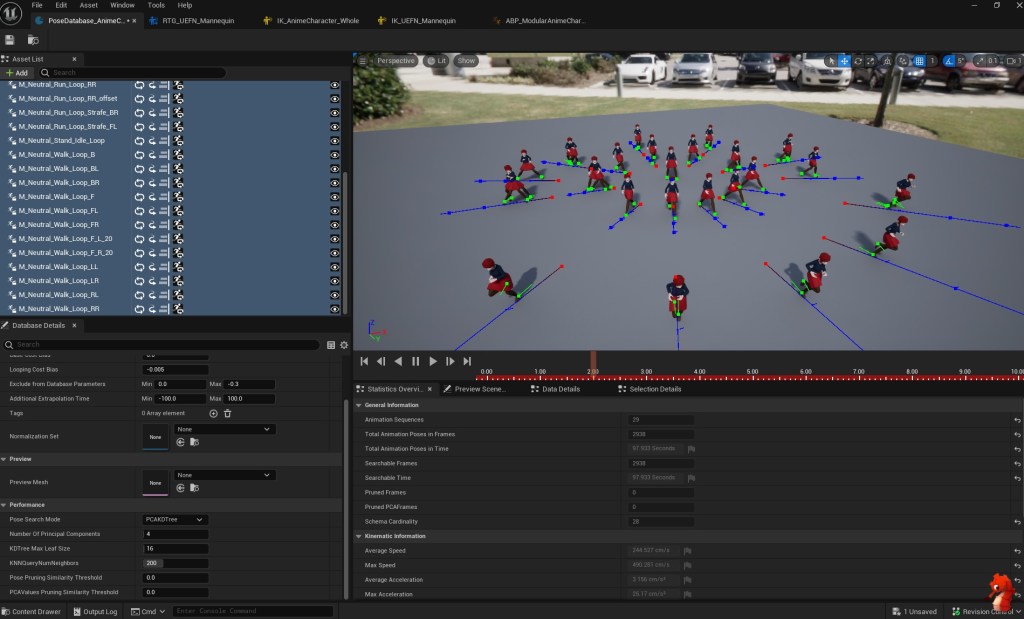
These characteristics can often be separated into two categories: pose and trajectory.
Pose Data
Pose-related information that is most commonly used to match anim frames includes bone locations and bone velocities. Especially for locomotion animations, the location and velocity of the foot bones are useful.
This is at least the most basic setup; however, motion matching is all about tweaking what information you track and the weight it has on the result. So, you might also want to track the location of the arms or track something more advanced, like the phasing of the feet, to improve results.
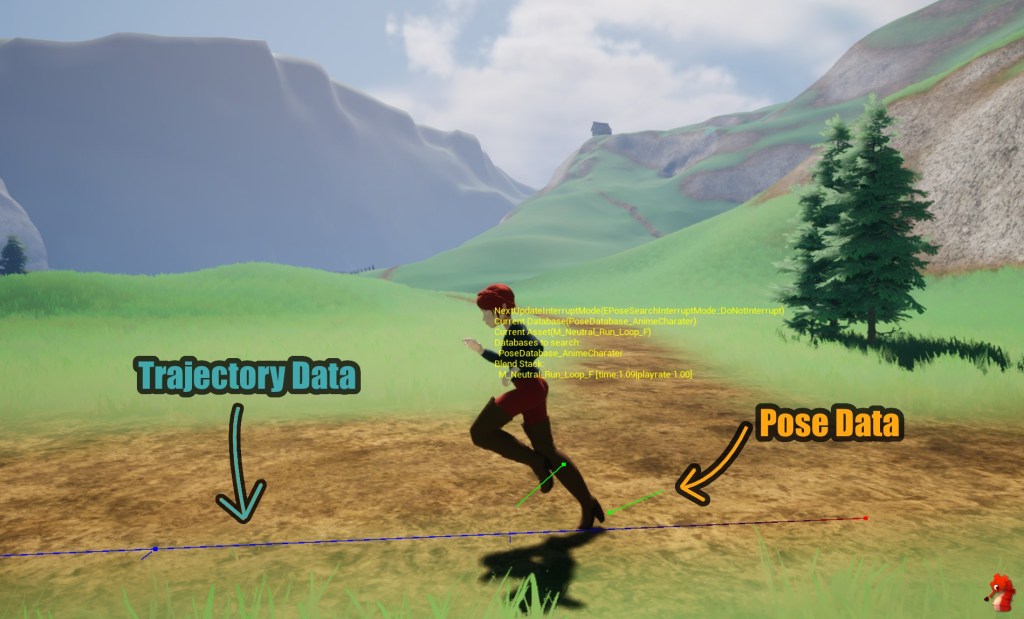
Trajectory Data
Trajectory-related information contains details about the past, present, and predicted future of the character’s movement.
Usually, you’d care about the velocity and facing direction of the character at certain time intervals.
E.g., how fast was the character 0.3s ago, how fast are they going now, and how fast do we expect them to go in 0.3s?
The time delta between the intervals and the number of intervals into the future and past are up to the user to tweak, but in my experience, two time steps into the past and three into the future at a time delta between 0.2 – 0.33s yield the best results – but it all depends on your use case and animations.
Another part of the predicted future that can yield super cool (that’s a professional term, yes 😉) results is to consider collision data or other objects in the world when predicting the character’s movement.
Imagine a character running towards a wall and it predicts that at the current speed it will hit it in 0.6s; now we can use that information to pick an animation that will come to a stop in that time frame, leading to a fairly world-aware animation reaction.
Matching
Using these data points, made up of pose and trajectory data, we compare that now at runtime to our library of animation poses and pick one with the best score. Each of these data points can also be assigned different weights to tweak which part you care most about.
It’s important to keep in mind that in order to be able to read the required trajectory data the animations of your library need to have root motion!
After the very first run, you will usually check if you can stay in your current animation (e.g., if you have a run cycle) by checking its score against a threshold to avoid unnecessary searches when the current animation is still good enough.
Now in the worst case, it would select a new pose every single frame and every time it has to select a new pose that isn’t a continuation of the current anim there will be ever so slight (or not so slight) differences between the poses that need to be blended together.
Blend Methods
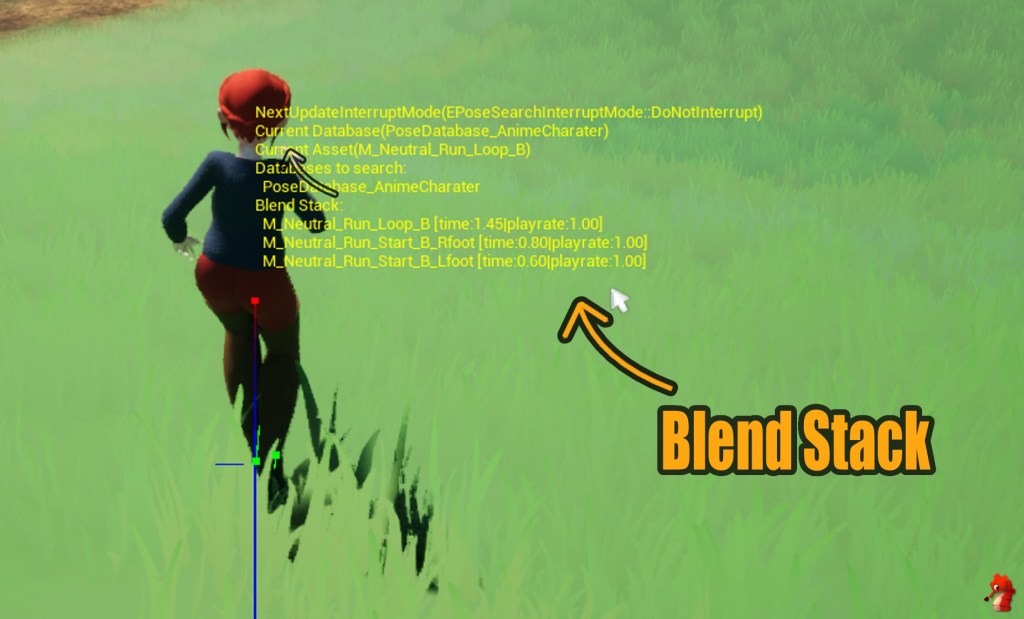
There are two common ways the blends are done for motion matching: a blend stack or inertialization.
Blend Stack
For a blend stack blending, you simply keep the last animation playing with a decreasing weight over a configurable blend time.
Every time you pick a non-continuing pose, you add the previous animation to the stack, resulting in multiple animations blending together over a short period.
Often the blend stack will have an upper limit to avoid having to blend too many animations together and keep them all updated; however, in an optimized system, you should have enough animation coverage to not have to switch poses so frequently that it hits that limit.
Inertialization
Inertialization is an alternate way of blending animations together; instead of keeping previous anims around and having to keep updating them, it blends out the previous anims’ velocities over a blend time.
This is more lightweight and can result in a decent end pose, but can come with its own limitations e.g overshooting.
Optimizations and Modifications
There is so much more you can do to improve a motion matching system; it’s nearly endless. Here are some of the more common implementations:
Animation Mirroring
To cut down on the amount of anims needed, mirroring existing animations when building your library can provide further coverage.
Extrapolate Trajectories
If you extrapolate the trajectory of your library animations at the start and end you get more useable poses out of one animation.
Looping Animations
Similarly for looping animations (e.g. walk cycles) you need to support reading the trajectories correctly for looping animations.
Marking Animation Frames
It’s useful to have some way of marking certain anim frames with additional information, for example to exclude them completely from the pose search or to not allow them to be a search result but can still play if the system stays within the same animation.
In UE5 this can be easily achieved by Animation Notify States.
Offsetting the Root
Another useful trick to achieve better and more consistent results is having some way of offsetting the root bone within a certain threshold to follow the animations root – basically injecting some root motion back into your movement.
This can help with following the animation more closely and stay within cycles, although it has to be handled carefully to not alter your query too much and no longer match the players input.
Changing Play Rates
Another very easy but impactful trick is to allow changing the play rate (the speed) of animations at runtime when picking a new pose. This can help to more closely match the players movement speed.
You can only adjust the play rate within a small threshold of about +/-20% though, otherwise the animations will start to look very weird.
And that’s about the gist of it, if there is any more interest I could go deeper into Unreals version of Motion Matching and write a little How-To in the future ☺️.
But that’s it for this week, have a lovely time out there 🌈👋.
 SneakySeahorseGames
Leave a comment. (Email and Name are not required to be filled in)